
Why Mobile App Releases Are Harder Than Web Deploys (And What to Do About It)
Web deploys feel instant. Mobile releases involve builds, store review, and user updates. Here's why agile ship-fast breaks on native—and a practical cadence that works.

If you've shipped both web and mobile, you already know the feeling. On web, you merge a pull request, the pipeline runs, and minutes later users are on the new version. Someone notices a bug, you roll back a deploy or flip a feature flag, and you're back to normal before lunch.
Mobile doesn't work like that. And the gap isn't a tooling problem you can solve with one more CI step. It's structural. The same agile instincts that make web teams fast can make mobile teams feel like they're constantly behind—and constantly surprised.
Web deploys vs. mobile releases: what's actually different
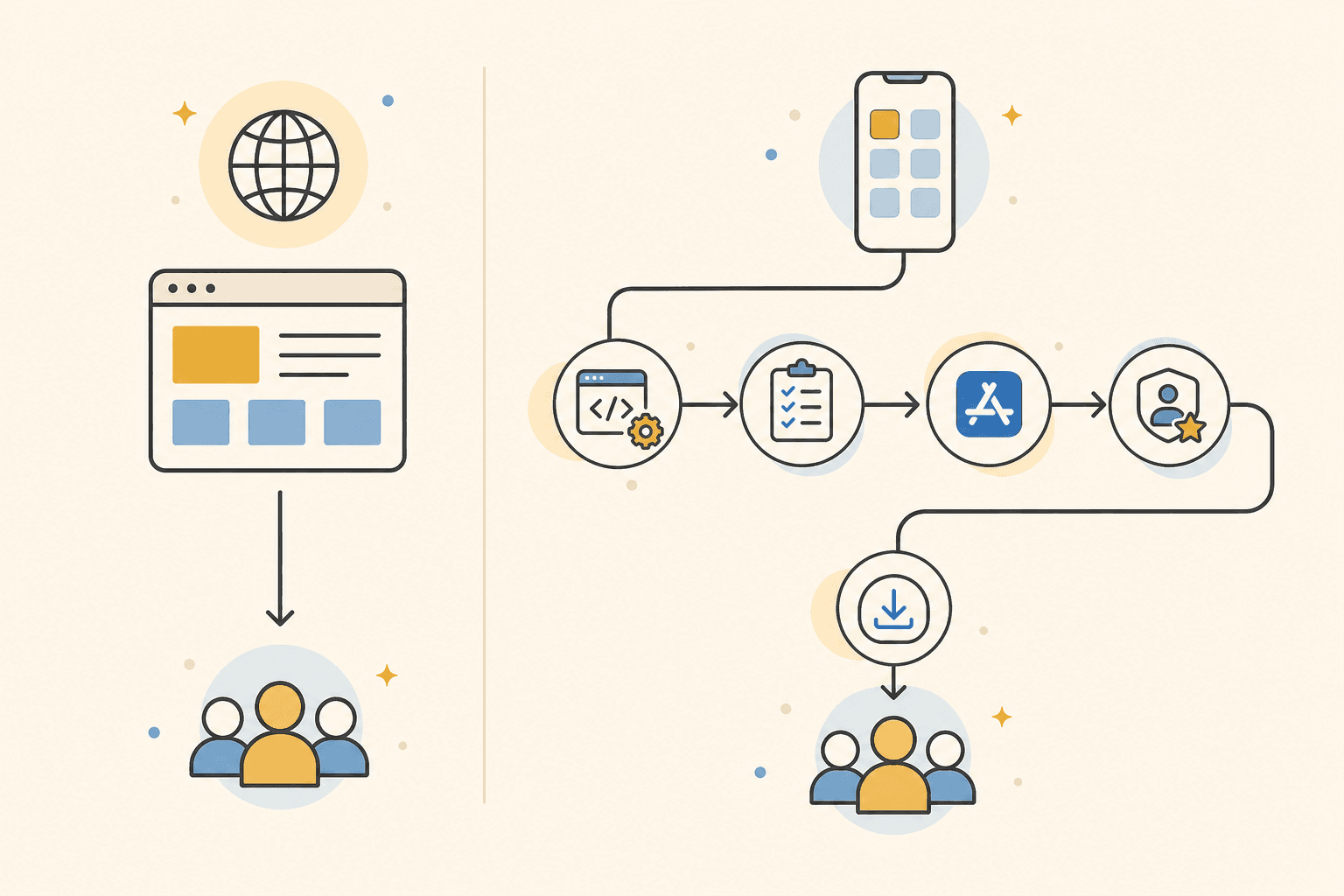
On the web, deployment is mostly a delivery problem. You push code to a server. Browsers fetch the latest assets. Users don't choose whether to update; they just get it on the next page load.
Mobile adds layers that web teams rarely think about:
- Builds are heavier. You're producing signed binaries for multiple architectures, often through Xcode and Gradle pipelines that fail for reasons unrelated to your feature code—expired certificates, provisioning profiles, dependency conflicts.
- Store review is async and opaque. Apple and Google sit between you and your users. Review can take hours or days. Rejections send you back to the start of a loop you thought was finished.
- Users must actively update. Even after approval, a large chunk of your audience may stay on older versions for days or weeks. You're never truly "fully deployed."
- OTAs only go so far. Over-the-air updates (React Native, Expo, CodePush) help with JavaScript bundles, but native code changes, new permissions, and SDK upgrades still require a full store release.
At a large e-commerce clothing company where I worked, mobile releases were business-critical and always urgent. Stakeholders wanted features live for campaigns, sales events, and partner agreements. But the path from "code merged" to "users have it" was nothing like the web team's same-day deploys.
Rollback isn't revert—a commit. It's another release.
This is the part that catches teams off guard. On web, rolling back often means redeploying the previous artifact or toggling a flag. The fix is fast and low-risk.
On mobile, rolling back means shipping again. You need a new build, another round of QA, another submission, another wait in review. If the bad version is already live, you're racing the clock while users download the broken build.
That changes how you should think about risk. A "small" bug on web might be annoying for an hour. The same bug on mobile can sit in the App Store for days before a fix reaches everyone. Teams that treat mobile releases like web deploys tend to under-invest in pre-release testing and over-invest in post-release panic.
Why "ship fast" from agile breaks down on native
Agile taught us that more frequent releases mean faster learning. That's largely true on web, where the cost of a bad release is low and the cost of delay is high.
On mobile, the math flips:
- Every release costs real time in build, test, submit, and review.
- A rushed release that introduces bugs doesn't save time—it creates a bug-fix release that doubles the cycle.
- Stakeholders who want "just get it out" often don't see the hidden work: the build that failed overnight, the QA cycle that found a regression at 4pm Friday, the review that stalled because metadata was wrong.
Shipping fast without a sustainable process doesn't make you agile—it makes you reactive. I've seen a PM planning a go-live announcement while the developer was still fighting a production build failure, and nobody else in the room knew. The goal isn't to release slowly. It's to release at a cadence where each release sticks, so you're not paying the tax of emergency follow-up releases.
A practical release cadence that actually works
There's no universal answer, but a few patterns hold up across teams:
Align release rhythm with business risk, not sprint length. A weekly release might work for a mature app with good test coverage. A biweekly or milestone-based cadence might suit apps tied to retail calendars or partner launches. The cadence should account for store review time—not pretend it doesn't exist.
Treat the release as a first-class workflow, not a deploy step. Before submission, everyone should know: Is the build green? Is QA complete? Are store listings updated? Who approves go-live after store approval? These aren't technical questions—they're coordination questions that mobile makes visible.
Give developers ownership through release. On bigger teams, it's easy to merge and hand off. Linking tickets to the people who wrote them—and making go-live visible—changes behavior.
Invest visibility before velocity. You can't remove store review, but you can stop wasting hours in status meetings asking "where are we?" Teams that get mobile releases right design a cadence, assign clear owners to each step, and put status where people already work—usually Slack, not a dashboard only the lead dev opens.
ReleaseSteps is a Slack app built for exactly this: create a release with /releasesteps, assign steps to the right people, and get App Store and Google Play status updates in the channel—so nobody has to chase the developer to check a console. See pricing — $79/month per workspace.